For all of those who have tried to use generative AI to add text to an image, we feel your pain. AI has become increasingly sophisticated in its ability to generate more detailed and more accurate copy and images. What it has struggled with, alongside generating hands with the proper number of fingers, has been adding text to the image. Even something as simple as “Happy Birthday!” often looks like it was written in sidewalk chalk then hit with heavy rain.
That’s why there has been so much excitement over Dall-E’s recent upgrade to Dall-E 3, now integrated into paid versions of ChatGPT. This iteration can handle significantly more nuance and detail than previous versions. That includes the ability to add detailed and accurate text. Platforms like Midjourney and Canva allow users to add longer, more detailed text manually as part of a separate layer, but it’s not being generated by AI. That’s why this update is causing such a stir. Now you can generate even highly detailed text within the image as part of a single prompt.
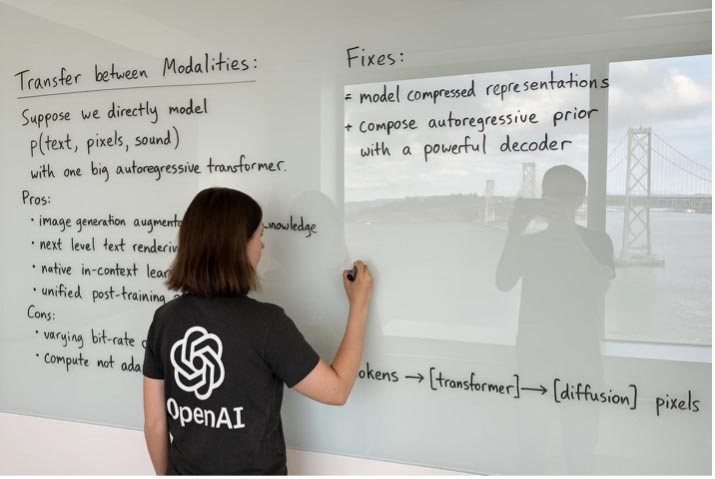
AI image generated by Dall-E 3 within ChatGPT as displayed on ChatGPT’s Dall-E 3 information page (https://openai.com/index/introducing-4o-image-generation/). The entire image was created from a single prompt.
Michelle Moxley, freelance designer and AI app creator, is among those on the cutting-edge of this technology. Through her Fahrenheit AI blog (and now vlog), she has been tracking AI for a number of years and knows how it thinks. To generate text over images, she has been using Ideogram’s AI image-generation platform, but it is a multi-step process. The new capabilities of Dall-E 3 within ChatGPT offer her greater speed and detail. She also likes that it allows her to do research and refine prompts right from within the image generator.
What sparked Moxley’s recognition that the new Dall-E model was truly different from its predecessors was seeing a sample image of a stack of parking signs created in the new version. All five signs have different text, layouts, and graphic details, yet were created from a single prompt.
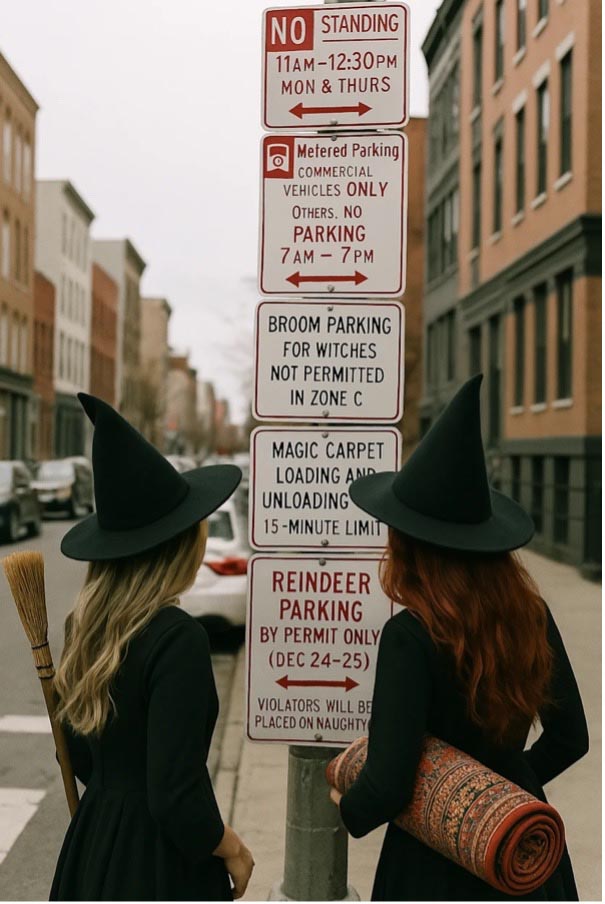
Sample of street sign generated within ChatGPT with a single prompt. How many times was the prompt tweaked before the image came out perfect? We’ll never know, but the prompt (also provided on ChatGPT’s image generation page) is 200 words long.
Impossible Until Now
“Prior to three weeks ago, this would have been impossible,” Moxley says, noting that this new capability has real, practical implications for her business. “There have been complex designs for which I haven’t been able use AI because they are too custom. I might use AI for pieces of it, but I have to build each piece separately and combine them, and that takes time. Then the customer says, ‘I want to change this, or change that,” and depending on the complexity, that can take hours. Being able to use Dall-E 3, through its integration with ChatGPT, cuts down that time to a matter of minutes.”
Say, for example, Dall-E creates an image in oranges and blacks, and the client wanted it more patriotic. “I’ll ask it, ‘Can you make this red, white, and blue?” says Moxley. “Then I’ll refine the prompt by saying, ‘Don’t use flags, and don’t change the original very much.’ It will come up with variations on that design, honoring the original.”

Moxley recreated this image from an AI-generated image used in a recent What They Think article. The original image was generated in Midjourney, while this one was created in ChatGPT Plus. In the first iteration, some of the headline was buried behind the dollar bills in the Statue of Liberty’s hand. To fix the error, Moxley refined her prompt and did a second generation to achieve the result above.
It Helps to Be an AI Whisperer
Of course, it helps to be an AI whisperer like Moxley. What might take the average person many more tries, Moxley can hit in one or two because she “knows how to talk to AI more than most people.” This experience is reflected in the AI-generated image above, which took Moxley only two tries.
How did she do it? First, Moxley created a prompt asking ChatGPT to recreate the Statue of Liberty image used in a previous WhatTheyThink article, plus the added text. The first iteration buried the text behind the dollar bills in the statue’s hands, however, so Moxley tweaked the prompt to use the word “overlay” (as opposed to “put” or “generate” the text) and described the context of the text in more detail, including that it looked “like a stamp.”
“The more you interact with AI, the more you see its successes and its failures,” she explains. “Then you start feeding it what you’ve learned from its successes, and that success builds on itself.”
It’s all about knowing how to create and tweak the prompts. For example, if Dall-E 3 keeps generating the text in the wrong spot, even subtle changes in the prompt can force different results. For example, changing “put” to “relocate.” Or, as in the image above, changing the prompt from “adding” the text to “overlaying” it.
Lest you think it’s that simple, however, Moxley adds a caveat. You might get the generator to produce the specific detail you want, but then it will change different aspects of the image that you don’t. “That is part of its nature,” she says.
It’s a Good Speller, But..
What are the limitations of Dall-E 3? It’s a good speller, Moxley says, but it’s not font-creative. Historically, Moxley has used Ideogram to generate text over images because it allows her to provide lots of detail on the font, such as “a script font, elaborate, and in an arch pattern.” “I can tell Dall-E to do those things,” she explains, “but I get back a lot of serif fonts that look similar to each other. It also doesn’t offer creative flair around text. You can force it, but it starts making mistakes.”
Once Dall-E starts making mistakes, Moxley says, it’s time to start over. “If it’s already going down a bad path, sometimes you have to completely clean the slate and start from scratch,” she explains. “This takes it out of the train of thought it’s in. Otherwise, it will get stuck in that space.” (In trying to recreate Moxley’s Statue of Liberty image, for example, What They Think kept getting images that said, “Tarills” instead of “Tariffs,” so we had to start over.)
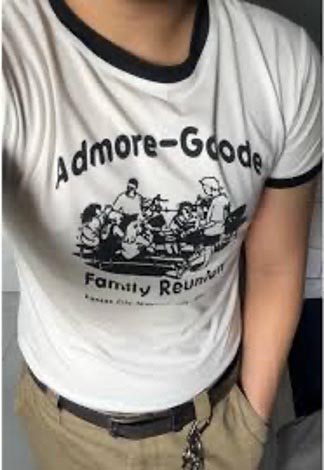

Sometimes a client will come to Moxley asking to recreate a T-shirt design. With the new Dall-E 3, she can do that in a matter of seconds. The image was generated based on the photograph above.
That’s why Moxley loves AI as an idea-generation tool as much or more than as a final image generation tool. It can take a while to get ChatGPT to generate the perfect image, but when it comes to ideation, the details don’t have to be perfect, and AI cuts down the rework time by hours.
Especially when you have a very engaged customer looking to be part of the ideation process. “When you have a customer asking, ‘Can I see it this way and this way?’ I used to give them only three options to pick from,” she says. “Now they can see as many iterations as they want. Maybe I have to go back and rebuild the final image so all of the details match up, but at least I’ve gotten to a starting point much faster.”
In other words, even Dall-E 3 within ChatGPT still needs you to holds its hand…for now. “It’s like a really smart toddler,” Moxley concludes. “But one day, it will be a really smart adult.”