This article is sponsored by Fiery as part of WhatTheyThink’s Print Product Spotlight series. In preparing this article, the WhatTheyThink Print Product Spotlight editors conducted original, in-depth research into Fiery's JobFlow Pro Platform. This Product Spotlight describes what the editors feel are the platform’s strengths in the marketplace. Fiery previewed the final article for accuracy but had no editorial control over the content. product
(Watch David Zwang’s video interview with Hans Sep, Fiery’s Product Line Manager, here.)
Fiery, now part of the Epson Group, rapidly became the gold standard for DFEs, enabling the growth of digital color printing across office and commercial settings, with custom hardware and RIP (Raster Image Processor) software. More than 2 million Fiery DFEs have been sold worldwide, powering equipment from major manufacturers such as Canon, Konica Minolta, Ricoh, Xerox, and many more. Fiery Impress further extended the Fiery platform’s reach into specialty inkjet presses, bringing scalable workflow innovation to new segments like packaging, display graphics, and textiles.
Fiery JobFlow Pro Platform
Demands for intelligent automation are increasing to support a wider range of equipment, operators and processes, even extending into the supply chain. This results in a need to rethink and redesign how people and machines can work together more efficiently.
Fiery JobFlow Pro is a new and very innovative workflow platform that has been developed from the ground up with that in mind, and supports all past and future Fiery implementations from office machines to Impress production integrations. Building it from the ground up allows them to address software limit concerns of current customers, support new demands and significantly increase performance. It is powered by large language models (LLM), and currently supports Open AI’s ChatGPT and Anthropic’s Claude with support for Google Gemini and others coming soon. One of the decisions they have made is to have the customer register their own LLM accounts for features that require large language models. That way customers own their own data and their own accounts, because Fiery does not want to see the customer data or limit where customers may want to use the LLM accounts to develop other important business functions.
JobFlow Pro enables your printers, software, and finishing equipment to “talk” to each other automatically. Instead of you manually checking job status or moving files around, it uses, among its own open messaging system, the MQTT (Message Queuing Telemetry Transport) protocol to share information in real time. Through a Publish/Subscribe model, JobFlow Pro acts as the central hub, routing messages instantly between devices, sensors, and applications. This new model goes beyond current rule-based automation tools by using real-time, intelligent decision-making to analyze job content, trigger workflows, and apply the correct settings and templates automatically. And if something changes on the press or in finishing, the workflow adapts without you lifting a finger. It’s Industry 4.0 automation with MQTT, IoT sensors, and real-time analytics in action—a connected print shop where everything runs smoother, faster, and with fewer mistakes.
The JobFlow Pro platform also uses a next-generation, intuitive visual interface, so no advanced scripting or IT support is required, making it much easier to work with. JobFlow Pro provides an intuitive browser-based editor where users create flows by visually connecting nodes together which can represent data sources, processes, and outputs. The graphical interface, based on an opensource automation platform, allows programmers and non-programmers alike to build applications quickly, by using the JobFlow Pro pre-built nodes, creating their own, or using the thousands of reusable nodes contributed by a growing large open-source community.
JobFlow Pro In Practice
To support the need for multiple and disparate onboarding streams, JobFlow Pro includes a robust API, and an almost limitless range of connectivity options for integration. Once the job is acquired, it is processed according to defined parameters automatically, or semiautomatically if desired.
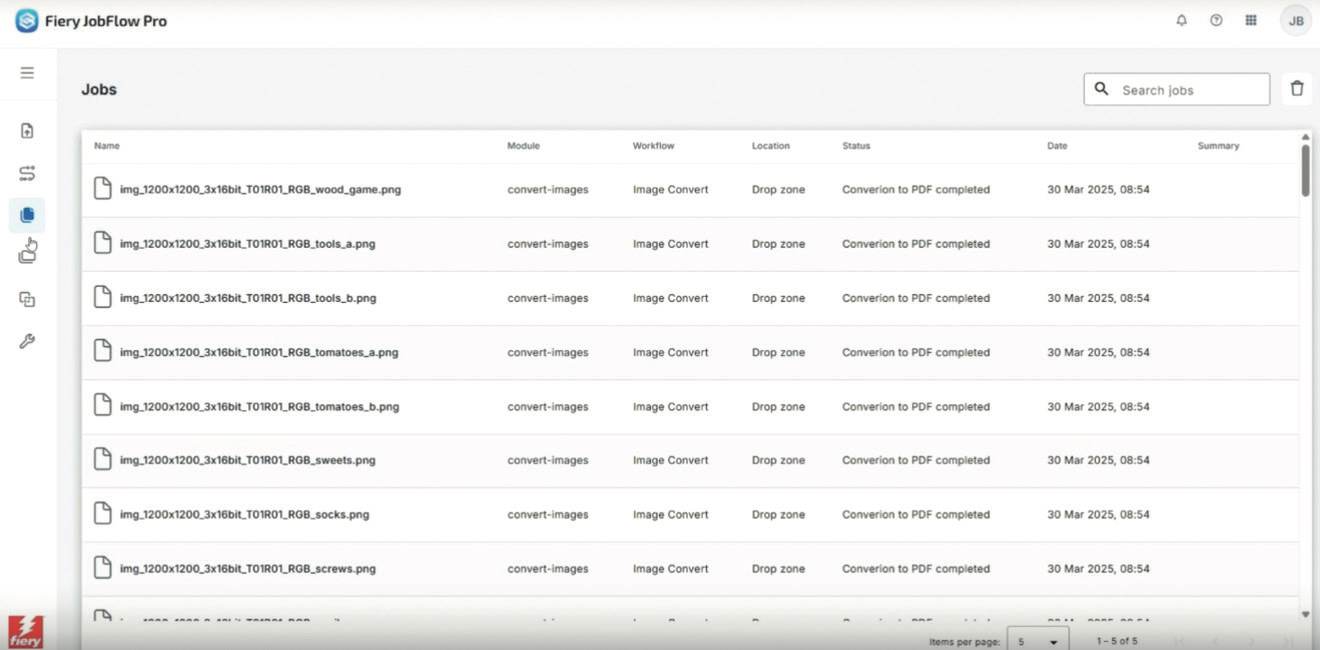
Take a simple example of an image to PDF workflow, using predefined drop zones, which can be defined on a user-by-user basis. In this case you can copy paste or drag the image, for example, into an Image Convert drop zone or a hot folder and the images are converted to PDF in a couple of seconds. As a result of the new platform, this is a significant performance improvement over the current version of Fiery JobFlow. It can also create a job log so customers can feed this information into other systems should they want to.
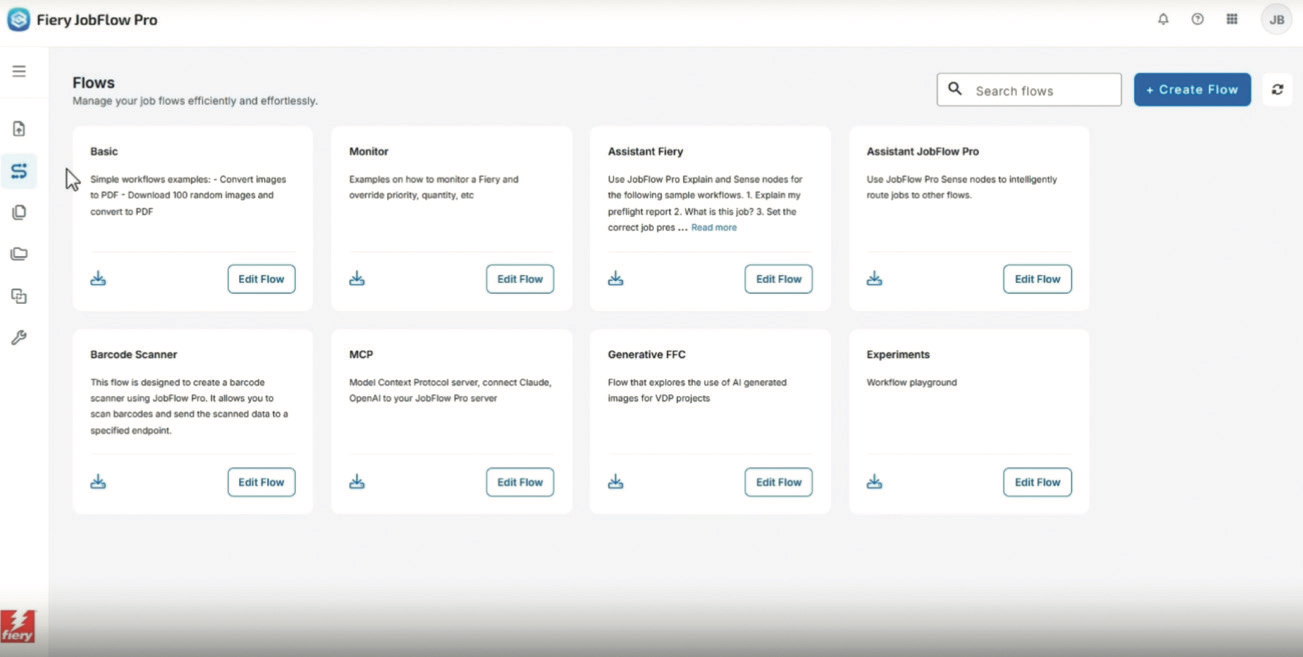
JobFlow Pro supports advanced preflight checks with the Callas pdfToolbox engine. What’s more, by using the new AI assistance functionality it can translate complex preflight reports into plain language based on the operators experience level. A seasoned prepress operator might see a concise technical explanation with suggested fixes, while a student intern would get a step-by-step breakdown of what the issue means and why it matters.
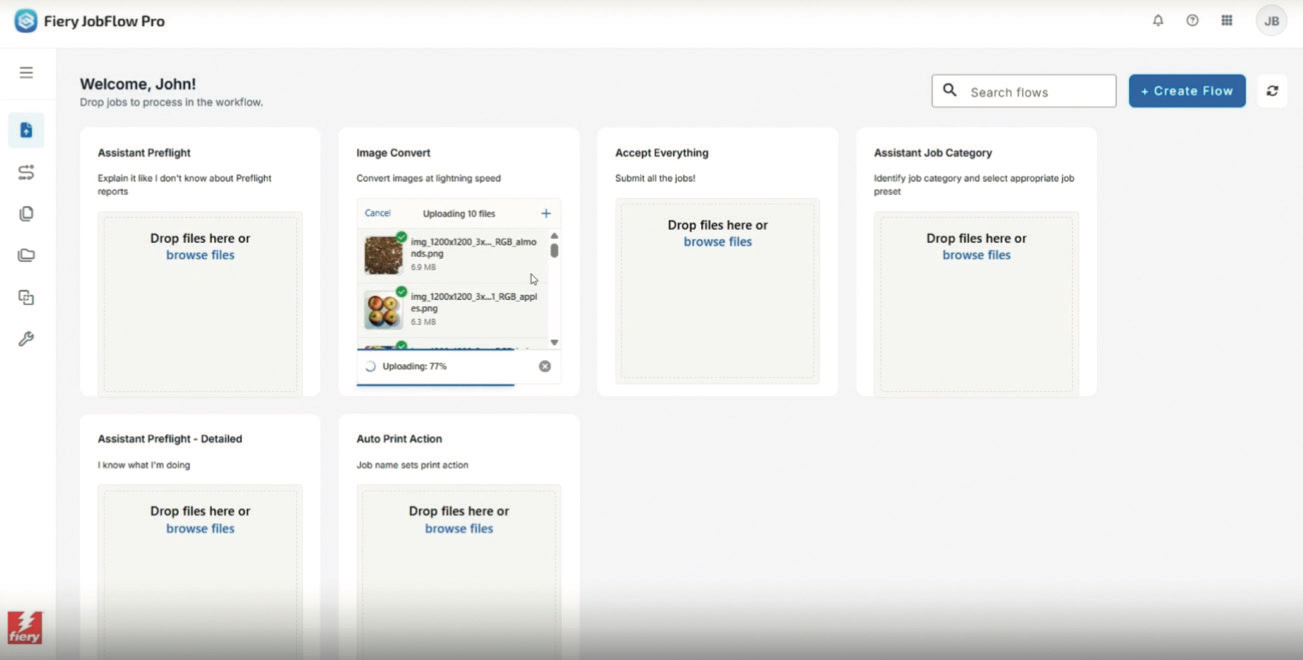
In a more automated workflow mode, JobFlow Pro uses real time, intelligent decision-making to analyze job content, trigger workflows, and apply the correct settings and templates automatically, eliminating the need for operator involvement.
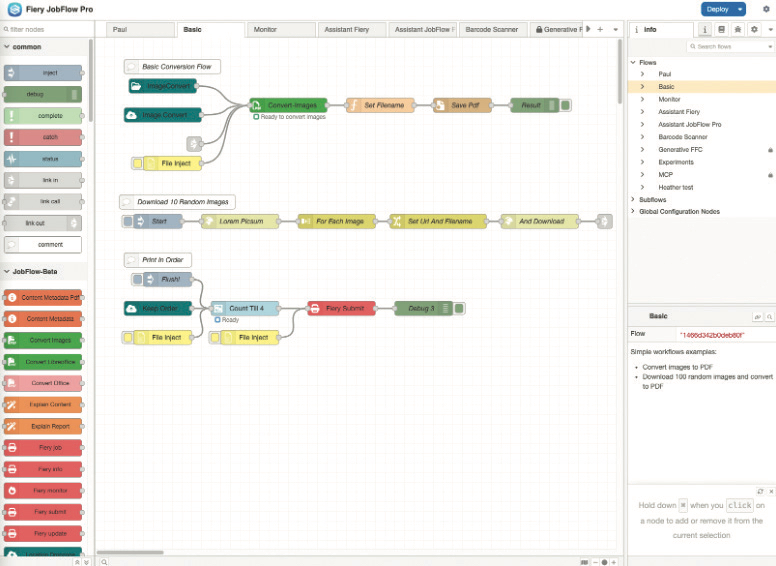
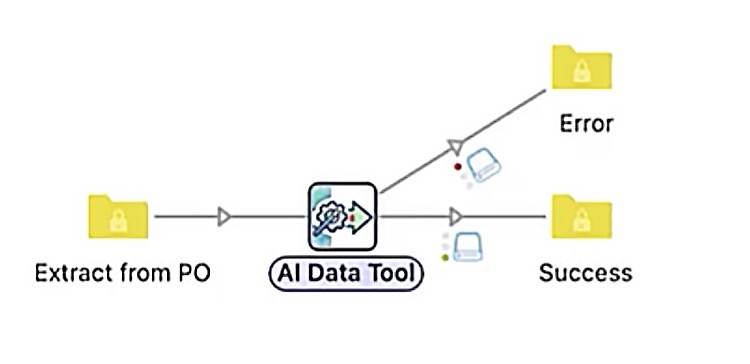
Using the Workflow Editor, different nodes (which define actions) are connected together to create the flows. These flows can be triggered by analyzing the incoming file name, metadata, job content, box sizes, and job category. The nodes can be user created or imported from a growing resource of thousands of pre-built nodes including databases, web services, and visualization dashboards.
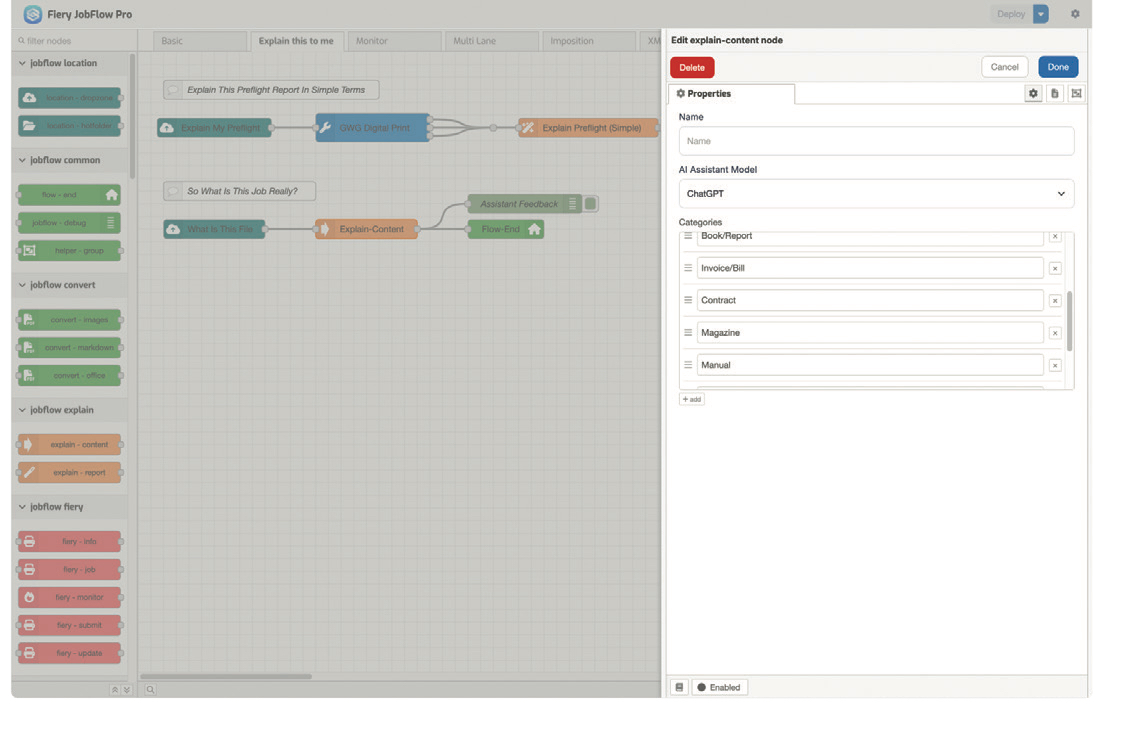
Previously, an operator would create a list of job presets with very precise descriptions in Command WorkStation and has to manually select the correct preset to apply print settings and templates.
With JobFlow Pro, predefined job categories automatically trigger workflows, and jobs can be routed based on naming, metadata, box size, preflight report results, or job category to ensure they are sent to the Fiery with the correct preset. The main difference being that in addition to the categorization, the LLM can validate these categories and suggest the best preset match on the Fiery. For example, if a business card file is detected, either by the file name or box size, it will automatically process it according to the business card category workflow.
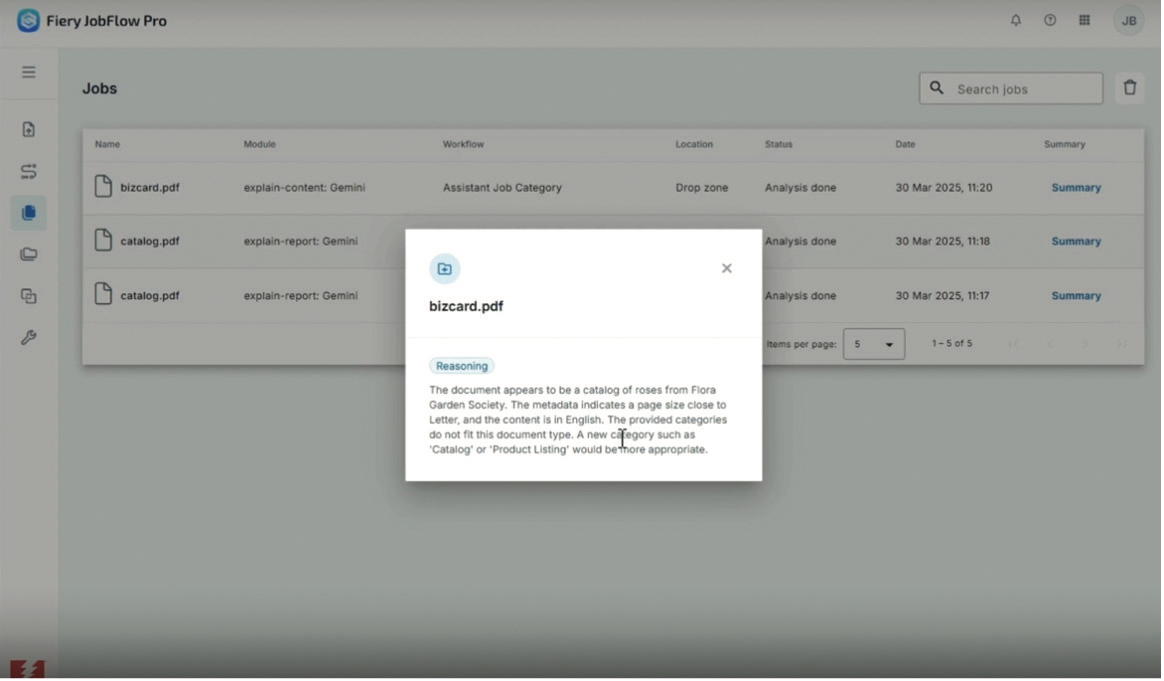
If a job doesn’t match an existing preset, JobFlow Pro explains what the file is, and suggests creating a new preset that better matches the expectations of how the job should be printed. For example, it may notice that a file tagged for “premium media” could actually be printed on standard stock, and suggest creating a different preset. Or if a job is identified as a catalog, but you only have presets for brochures and manuals, it recommends that you add catalog to the approved list so similar jobs are routed correctly in the future.
Trigger Workflow Based On Device Feedback
In addition to sending jobs through traditional automation methods (tickets, hot folders, job submissions), JobFlow Pro can also trigger workflows based on device feedback. For example, if you submit a job to a workflow called Auto Categorize, JobFlow Pro can tell the Fiery what to do with the job based on the file name. So if it has the word “delete” in the file name, it will print and delete the file, regardless of the print queue. If you submit a job with “now”, it would jump the line and print immediately, prioritizing it over other jobs that are waiting to print. This reduces the need for operators to manage different print queue settings, since JobFlow Pro will automatically apply the correct job action when sending the job to the Fiery.
With the current JobFlow, jobs can be submitted through the JobFlow browser UI, a hot folder, drop zone, or via Command WorkStation. JobFlow Pro expands this by also supporting inputs from email, job tickets, eCommerce platforms, MIS systems, and other integrations. This makes it possible to keep a printer running nonstop, whether in an enterprise environment or connected to an eCommerce site.
Another advantage with JobFlow Pro is when a job is submitted to the Fiery server using Command WorkStation, you could use the Fiery Monitor node to send instructions back to the Fiery. Let’s say there is a job that you want to set or change the quantity after it is processed and before it is printed. This can be done by editing the number in the file name that is between the brackets. After a job is submitted, you can then update the number of copies when sending it to the Fiery. This can be applied to any job that comes in, not just jobs tied to the auto-quantity preset.
JobFlow Pro also includes a dashboard, similar to the current JobFlow, showing job details, the workflow steps, location, status, and completion time. It also has a locations panel, where you can manage your hot folders, network folders, FTP, secure FTP, and all the Fiery servers from basic office printers to high-speed production printers.
Augmented Intelligent Automation
From machine learning, scaling process automation, robotic processes, to supply chain alignment, we are seeing automation rapidly expanding and reshaping production. With the growing availability of application, process and production data, rules-based automation has evolved into more intelligent augmented systems. These systems combine flexibility and built-in intelligence to automate a wider range of applications. Fiery JobFlow Pro supports the use of tasks, triggers, actions, and filters that can be configured through an LLM engine, providing an almost endless variability and control of processes. The availability of AI based automation systems take supply chain processes to the next level.
Fiery JobFlow Pro is an innovative AI-assisted, no-code workflow automation platform built to streamline job prep and boost profitability in modern print environments. With intelligent file analysis, adaptive routing, and seamless integration, it brings Industry 4.0 automation to every stage of production for today and tomorrow.
More to Come…
I would like to address your interests and concerns in future articles as it relates to the manufacturing of Print, Packaging, and Labels, and how, if at all, it drives future workflows including “Industry 4.0 and 5.0.” If you have any interesting examples of hybrid and bespoke manufacturing, I am very anxious to hear about them as well. Please feel free to contact me at [email protected] with any questions, suggestions, or examples of interesting applications.