High speed production and industrial inkjet has come a long way in printing on surfaces known only to litho, flexo and pad printing. These technologies have been perfected over decades and have aligned themselves with the market expectations. Keeping expectations in check requires machine verification through weekly/monthly maintenance and fingerprint verification.
Inkjet requires no less attention than conventional printing methods. Although its print repeatability uses less manual intervention, the technology itself requires periodic checkups. These checkups can identify areas of the process which can be changing over time. Pretreatments, application, substrate, print heads and OPV’s.
Inkjet performs so fast and furious we often forget to stop and test to ensure all parts of the process are still performing as intended. Registration, head alignment, missing jets, pretreat applications, drying curing can all change over time.
It’s easy to forget the quality produced from a freshly delivered inkjet press; not noticing the subtle differences which happen over time. Like kids growing up, when you’re close, you don’t notice subtle changes until you compare them to the past. Working directly in the inkjet field, more often I would like to admit, I see many inkjet technology production changes which have gone unnoticed.
Improvement Projects
Improvement projects such as improving print quality, ink savings, color management or substrate qualification, are dependent on the condition of the inkjet device. These projects require production downtime. It takes a lot of coordination to carve out this valuable time for improvement projects let alone identifying machine issues at that time. Improvement projects need to happen to improve print efficiency, consumable options and fluid savings, and can take more time if the press is not producing its best.
Fingerprinting
If you conduct your own inkjet performance review or have a maintenance contract with your inkjet OEM, frequently fingerprint the entire print workflow. Each fingerprint is a specialized graphic file which when printed through the production process can test the press ready PDF RIP conversion through the inkjet printing process, testing image, color, raster, jetting, and motion control of the press. This is especially important as the RIP software/ firmware of inkjet devices are updated, and press mechanics installed or replaced. Gone un-noticed, these updates can have subtle to drastic differences in print or image/color quality.
Fingerprinting the RIP Process
The fingerprint process is often known as documenting the condition of a printing device but is also beneficial for confirming the RIP’s raster process and PDF conversion of color and graphic elements. Confirming a PDF is converted properly, this process checks accuracy of:
- Fonts
- Spot/CMYK Overprints for fonts, images, masking and shading
- Ghosting
- Masking
- Flattening
- Transparency blend modes
- Spot, pantone and ICC color conversion
- Bitmap image color conversion
- And more…
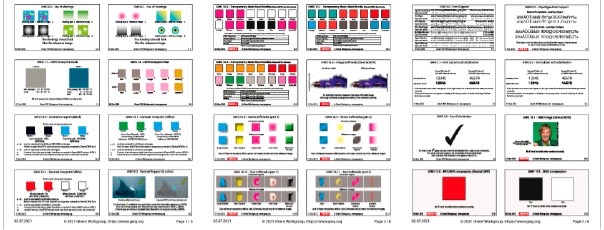 Sample tests from a complex Ghent PDF Output Suite 5.0- Sample Sheet[/caption]
Updates to internal, external, or digital front end firmware can sometimes change how graphic elements are processed.
Recently, this very thing occurred. Luckily, the printer and I previously worked together fingerprinting his device using the Ghent PDF Output Suite 5.0 test sheets within our printed press fingerprint file. Comparing earlier prints to recent, we noticed only RGB image conversions are affected. Pinpointing the recent firmware change created an issue with RGB color space conversion in the internal RIP. This saved time working with the OEM to resolve the issue of getting the press back into production.
Printing the Ghent series of tests for other customers over the years has identified flattening, transparency, and color conversion limitations of a RIP.
Fingerprinting the Press
Fingerprinting a press contains a different series of test images. Once printed, this process produces a measurable reference sample for capturing color values documenting the performance and print health of the inkjet device. This reference helps with any press changes which occur over time affecting print quality such as:
- Print head wear
- Fluid application- primer and OPV
- Jetting accuracy
- Missing jets
- Cross process uniformity
- Banding
- Registration
- Head alignment
- Substrate motion control
- Print quality vs. speed assessment
- And others
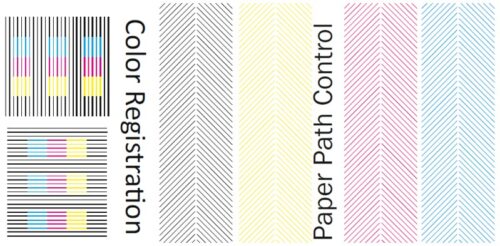
Sample images from complex fingerprint test
Inkjet print performance depends on how the files are prepared (helpful Designer's Guide Series), accurately converted in the RIP and processed to a healthy press. Keeping your process in check will reduce downtime and print issues if managed correctly.
An inkjet performance review is the first step in preparing improvement projects such as, custom color management, simulation targeting, ink savings application or new paper qualification. Improvements we will continue to talk about in upcoming articles, can increase production, print quality as well as save money in fluid costs
Remember taking time to review the health of your inkjet device will save you time and prepare for improvements and savings.