Many an inkjet evaluation has run aground in the murky waters of software requirements. I say murky because software requirements often aren’t as clear as hardware needs. If a piece of hardware is sitting on your floor you can see it. If it is connected to another piece of equipment you can see that too. A lot of software processes can be invisible, or just poorly documented, and there can be tentacles that integrate across the operation. There can be multiple tools for the same job, customizations, integrations and sometimes just an overwhelming number of individual applications.
Some companies think they are taking the easy road by focusing on
hardware requirements first and updating software later. There are a lot of potential problems with that approach:
- Paying for software capabilities you already have
- Buying the wrong software
- Increased costs of professional services
- Incorrect business case for justifying inkjet investment
- Inability to fully implement inkjet hardware to handle full volumes
Software is absolutely critical to getting the most out of an inkjet solution. That’s why we generally recommend doing a thorough software analysis before investing in hardware. For most operations, the ability to logically organize jobs and group them together for production is the key to keeping the printer up and running, avoiding paper waste and maximizing profit.
While there are a lot of problems that can be overcome by good pre and post processing software, the ability to get that software implemented at a reasonable cost requires, you guessed it, requirements.
The first step is creating a simple software inventory. This includes the software as well any hardware needed to run it. For example, think about all of the variations of the following tools you may be using:
- Composition and formatting tools (print and web)
- Reporting and dashboard tools
- Output management and Print MIS software
- Postal automation software
Then you need to think about the integration points you may have with finishing, inserting, QA/camera systems archival and reprint. There may also be some virtual duct tape in the form of manual processes keeping everything together.
It will help suppliers if you can provide a high-level visual of software application workflow from receipt of data to production reporting and billing. If there are distinct workflows for different types of applications, or those using legacy platforms you should provide multiple diagrams. Clearly indicate any manual/non automated processes or interfaces.
To help you along the way, we’ve created a series of worksheets to gather information about your current environment.
[restrict paid=true message="You must be a Premium Member of Inkjet Insight to access the Software Requirements Checklist.
Sign up now."]
Download the Software Requirements Worksheet
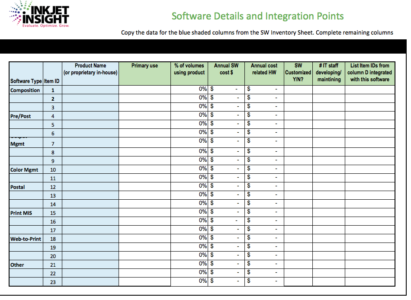
- The first tab is a basic software inventory for gathering license information by location.
- The second drills down on each product to get at the primary use, how much of your work relies on it, cost and integration points.
- The third is for identifying known issues with each product.
- Finally, we’ve added a tab for brainstorming. This is to give suppliers an idea of how you would do things if you could.
These won’t provide a complete requirements document but this checklist should save you a lot of time.
[/restrict]
About Elizabeth Gooding
Elizabeth is the former Editor and Co-founder of Inkjet Insight. She has a rare ability to see print related issues from many perspectives. She has managed creative teams on complex design projects, selected outsourcers for major brands and helped print organizations to retool operations, focus their market positioning and educate sales teams to accelerate growth. She works with a team of top analysts to translate experiences into tools, data and content to help print organizations evaluate the potential of inkjet, optimize their operations and grow pages profitably. She is a founding member of the Inkjet Summit advisory board, the co-author of an award-winning book on designing for inkjet and a curious consultant constantly seeking innovative ways to drive new pages onto inkjet presses.