Last week I pointed out some tools and tips for choosing and defining color schemes for print, but a creative project may cover many channels: digital media such as apps, email and web sites along with multiple formats of print.
Being efficient is what digital communication is all about. Helping save time and energy when designing for different media is an industry requirement that can be achieved through knowledge as well as finding cool apps and gadgets for designers.
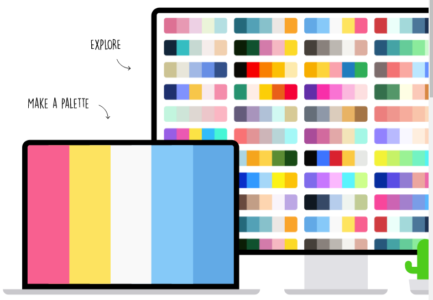
COOLORs - Adobe Creative Suite ExtensionWhen it comes to color and creativity, sometimes a little help is needed to create coordinating color pallets with customers. In searching for new color tools, we came across COOLORs. This is an extension to Adobe Illustrator, Photoshop and InDesign for your PC or Mac which allows you to simply choose a color and COOLORs will create the complimentary colors for a complete pallet containing up to 10 swatch colors with the click of a button.
• Visually create your color schemes with the super-fast generator • Explore thousands of ready-made palettes or go custom • Upload color schemes for easy access across different devices • Generate schemes with up to 10 color swatches and easy click
Easiest way to install is with Creative Cloud: 1. Ensure you have Adobe Creative Cloud installed and connected to the internet. 2. Go to: COLOORs.co 3. Check your Activity Stream in the Creative Cloud app to confirm the add-on was successfully installed. 4. Launch or restart Photoshop or Illustrator. 5. Go to Window > Extensions > select Coolors to open the Coolors panel. 6. Start creating various color schemes 7. Copy your color swatches to color pallets within Adobe Creative Suite 8. Share the same color scheme for other digital media designs
Initially designed for digital media design, this $3.49 app can create color schemes for Adobe programs to help with that first step of coordinating visual colors and complete the process by assigning true Pantone colors from the library. For print design, this is only intended to help with coordinating visual color schemes.
Continue the project by using your custom color scheme for any applications available for the iPhone, Apple Watch and iPad as well as electronic designs requiring complementary HEX color schemes.
But remember, before starting any color schemes, make sure your monitor is profiled and displaying colors correctly for the color space which you are designing for.
Inkjet Insight works with industry suppliers and developers to spotlight resources and tools to help designers develop complete color workflows across inkjet and other and digital print media. Check out the many creative solutions profiled on our Workflow & Software Finder.