Color matching tools are an important part of any inkjet customer education program, so we are continually adding tools to help you communicate with customers. Previously we provided a
free tint book tool for all registered members. The latest in our series of tools is a fully customizable
Process Color Guide for our premium members.
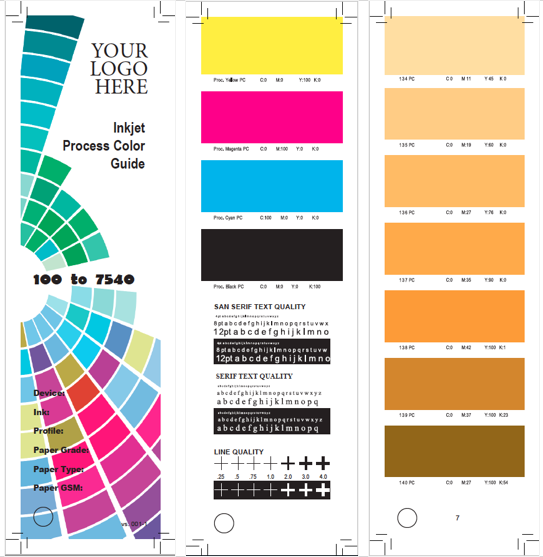
Designed as a fan book, the guide can be printed on each of your approved inkjet papers and supplied to customers as appropriate for their design project. This will provide your customers and their designers with a more accurate representation of the reproducible colors available from your specific inkjet ink process combination on the specific paper (using your production machine settings.) Designers will now be able to specify their process color combinations relative to your inkjet process and therefore should have consistent results that match their expectations. The slim design makes it easy for designers to keep copies for each of their most-used papers handy. Note that designers often pay for similar
color matching tools.
The file is an editable PDF which can be opened in Adobe. Insert your logo as well as the machine, color profile, paper, ink information specific to your inkjet process.
Note: The Process Color Guide should only be printed after the target paper has been
linearized and profiled. If you run your machine in multiple modes (performance and quality for instance) then you must create a version of the guide that represent each of those modes and make sure that the customer receives a guide that was produced using the settings for the mode that will be used for their work in production.
The guide also includes explanations and instructions for the designer. We will be updating our tools based on feedback from members. If you have recommendations for improving the design of the Process Color Guide or the instructions, or have an idea for similar tools, please let us know.
Instructions for the Designer:
This Inkjet Process Color Guide has been printed at the same speed and machine settings which will be used to produce your project to ensure that color and quality will meet your expectations.
Use the guide to find CMYK process color combinations reproducible with the paper and inkjet device shown on the cover. Each color block corresponds to the industry PMS color book number as a process color (#PC).
Keep in mind that a process color produced using inkjet may shift and look different from the PMS industry color of the same number. A hue built with a different CMYK combination may be closer to the target PMS than its corresponding #PC. Choose the color block from the guide that is the best match for your PMS target, and build the CMYK process color values into your Adobe program using the CMYK settings shown.
When naming your new color in Adobe, remember to add the machine, ink, paper and weight to the color name to ensure it is used for only that paper as each paper and weight may have a different CMYK combination.
About WhatTheyThink
WhatTheyThink is the global printing industry's go-to information source with both print and digital offerings, including WhatTheyThink.com, WhatTheyThink Email Newsletters, and the WhatTheyThink magazine. Our mission is to inform, educate, and inspire the industry. We provide cogent news and analysis about trends, technologies, operations, and events in all the markets that comprise today's printing and sign industries including commercial, in-plant, mailing, finishing, sign, display, textile, industrial, finishing, labels, packaging, marketing technology, software and workflow.